Check Your DOTNET
How to check what versions of .NET you have on your computer:
There are many ways to check what version of .NET (DOTNET) you have installed on your computer. Here are a few common methods.
Check for .NET in the File System
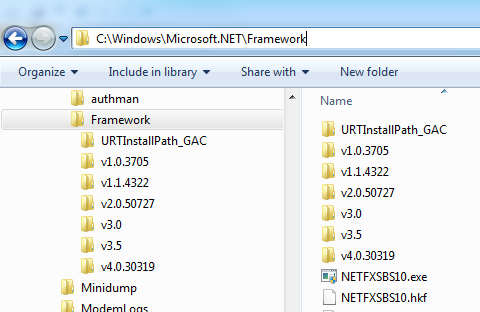
You can check your installed versions of .NET by navigating to Microsoft.NET\Framework under your Windows folders. The complete path is usually 'C:\Windows\Microsoft.NET\Framework. Each of the installed .NET versions will have its own folder.
Look in the Registry for .NET Installs
You can also check which versions of .NET are installed by looking in your registry in the following locations:
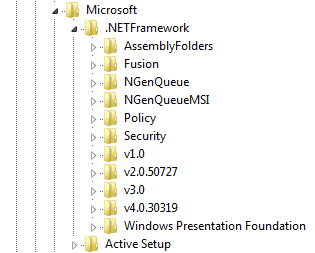
        HKEY_LOCAL_MACHINE\SOFTWARE\Microsoft\.NETFramework


        or

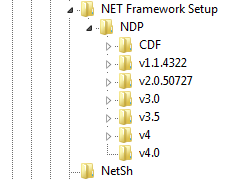
        HKEY_LOCAL_MACHINE\SOFTWARE\Microsoft\NET Framework Setup\NDP (better)
Check your registry with the following steps:
-
Click on your Microsoft Start button

enter "regedit"

and press enter. - If you are using Windows 7, you will probably run in to the message, "Do you want to allow the following program to make changes to this computer?" Click the [Yes] button to open the Registry Editor, even though you are not going to edit anything.
- Navigate to one of the two registry locations listed above.
The following is a picture of the first registry location on my computer.
This next picture shows the second location. Note that this location shows more detail? That's why I prefer it.
Installed Programs
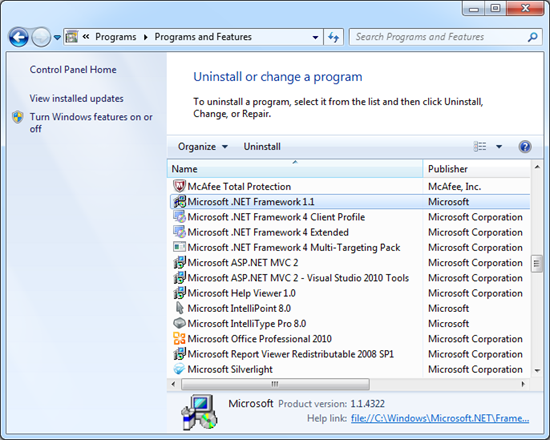
Although apparently not as detailed as checking the NET Framework Setup in the registry, you can also see which versions of .NET are installed by checking your list of installed programs. Go to your computer Control Panel and select 'Add or Remove Programs'. If you are using Windows 7, you may just need to click the 'Uninstall a program' link instead. Don't worry, you're not going to uninstall anything.
Here is what it looks like in Windows 7. Note that I can still see a bit more detail in the file system (first method) or the NET Framework Setup in the system registry?
Compatibility: Windows 7 (any version), Windows Vista (any version), Windows XP Professional, or Windows XP Home Edition (no other XP versions)