Calibration Control
Calibration Software for Asset Tracking
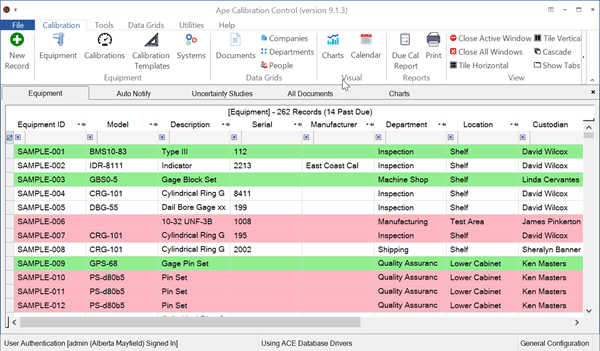
Use Calibration Control (our Calibration Management Software) to manage equipment and tools that require regular calibration or maintenance to confirm continued reliability and usefulness. Maintain certification to several quality and regulatory standards (e.g., ISO, ANSI, FDA, etc.).
Free to Try
Download a fully functional version of Calibration Control for a 30-day trial.
Use Calibration Control (Calibration Software / Calibration Management Software) in any industry including Metrology, Manufacturing, Assembly, Machining, Health Care, Aviation/Aerospace, Mining, Testing, Maintenance, Design Engineering, Oil Well, Distribution, Packaging, and others. Check out our customer reviews here.
Popular Features
Familiarize yourself with the capabilities of our Calibration Management Software by exploring the Help Topic Library (videos & screen shots).
FDA Compliance
Several security features exist to comply with the FDA's 21 CFR Part 11 standard.
Setup a Network
Share the same database between multiple users over a network or in the cloud.
Sign-In Mode
Enable security to control who has access to specific features and to record activity.
Attachments & Pictures
Attach/link computer files (e.g., pictures, forms, certificates) to Equipment or Calibration records.
Custom Reports
Customize the existing or create new Due Cal, Certificates, or any required report.
Quick Asset Transfers
Fast barcode-assisted asset transfer to departments, people, etc. logs lots of useful info
Data Grid Filtering
Quickly find records by filtering on any visible row using multiple filter methods.
Auto Email/Desktop Notifications
Send auto emails to remind users, managers, techs, etc. of equipment due for calibration.
Label Printing
Over 160 included labels template are completely editable or create your own from scratch.
Barcode Scanning
Scan bar-coded labels to perform quick searches, asset transfers, etc.
Custom Field Names
Lower the learning curve by using existing terms or just rename custom fields.
Hide Inactive Equipment
Hide equipment by status (e.g., inactive, out-of-service) to focus on important equipment.
Measurement Templates
Auto duplicate the template from previous calibrations so only measure results are required.
Calendar & Charts
See how many and when using the Calendar. Use the Charts to see just about anything else.
Tip: Quickly access the related help topic in any Calibration Control dialog by clicking the ? button in the top-right corner!
Schedule a Free Demo!
Contact us for a screen share demo of Calibration Control. We’ll show you around the software and respond to your questions and concerns. You tell us what you want to see, ask whatever questions you want, and we’ll make the demo just for you.