Calibration Control Folders
Calibration Control (our Calibration Management Software) has four folders directly accessible from the File drop-down menu in the application: Data, Files, Settings, and Web.
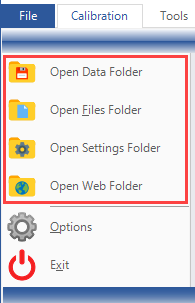
Purposes for Each Folder
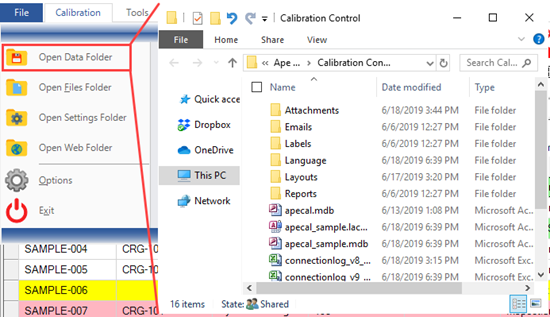
1. Open Data Folder
Selecting Open Data Folder from the File menu will launch the file explorer to open the folder path where the MS Access apecal database resides for Calibration Control. Move the Database location and re-configure its path for Calibration Control. On the other hand, if the database type is SQL Server, then selecting 'Open Data Folder' instead displays the current SQL Server connection.
2. Open Files Folder
Selecting Open Files Folder from the File menu will launch the file explorer to open the folder path where the four Files folders resides. This is the configured location for the Attachments, and Labels, Reports, and Emails templates that Calibration Control uses. This folder is often moved for shared file access among users. Refer to these steps for Creating a Multi-User Environment.
3. Open Settings Folder
Selecting Open Settings Folder from the File menu will launch the file explorer to open the folder path where the local Settings folder resides. This folder stores program settings that Ape Software requires in order to properly run and function normally. This is the only File Folder that cannot be moved from its original location, and each user must have read/write access to it!
The local path location of the CC Settings Folder is always:
(Windows 7 & Higher:) C:\Users\Public\Documents\Ape Software\Calibration Control
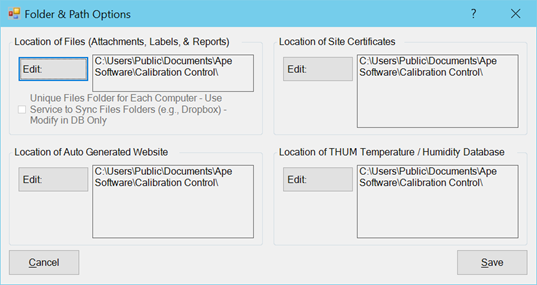
Note: Although all Folders share this same default location as the Settings folder when the software is first installed, the other three Folders' content can be relocated and manually moved to different locations on the computer or local network for sharing and backup purposes. The modified Files folder and Web Folder locations can then be configured in program Options > Advanced tab > Folder & Path.
4. Open Web Folder
Selecting Open Web Folder from the File menu will launch the file explorer to open the folder path where the website folder resides. The Web folder is the target location for publishing due-cal or custom reporting web pages. The location of the Web folder can also be configured in program Options>Advanced> Folder & Path.