Phone: +1 559-888-4325  
Toll Free: +1 888-912-0021
Skip Navigation Linkssite home | calibration control | features

Calibration Control Features

Features of our calibration management software

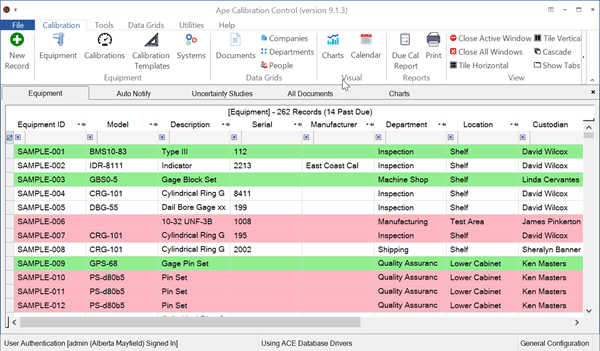
Calibration Control gives you the choice of simple data storage using MS Access or a more advanced solution using your own SQL Server.  Connect multiple users in your network or run the application on a single computer.  Keep your test equipment organized and managed according to their individual calibration cycles, metrology lab, physical locations, type, etc.  Keep it simple with our calibration management software.
Basic Features

  • Label Printing:  One-click Asset, Calibration, and No Calibration Required (NCR) labels.
  • Attachments:  Add any number of attachments to your equipment and calibration records.
  • Sign-In (User Name / Password):  User-authentication with role-based security.
  • 21 CFR Part 11 Compliance:  Includes electronic data controls to ensure data authenticity and integrity.
  • Change Log:  Tracks all field and label changes by date/time, user (when in sign-in mode), data screen, field, and before/after values.
  • Localization (Multilingual):  Add virtually any language upon request.
  • Editable Field Names:  Change the display names of fields to align with your company norms.
  • Custom Reports:  Use a standard report to create your own from scratch.
  • Barcode Scanning:  Print barcodes on your labels and use a barcode scanner for data entry and opening equipment records.  Use barcodes already on your equipment.  Automatically includes serial number.
  • Website Creator:  One click creates a website your organization can use to see their own equipment.
  • Equipment Pictures:  Add a picture of your equipment and/or location to its equipment record.
  • Grid Exporting:  Export to Excel (xls or xlsx), PDF, or XPS directly from all the major data grids.  You choose the fields & records.
  • Job Tracking:  Track the equipment (tools) used in every production job.  Useful when researching out-of-tolerance conditions.
  • Customizable Fields:  Change the field names the main edit equipment screen.
  • Legacy Integration:  Import from previous version of Calibration Control (e.g., Calibration Control 2000).
  • Data Importing Service:  We can help you import your spreadsheet data or possibly from older software.
  • Compatibility:  Compatible with all versions Windows XP, Vista, and 7.
  • MS Access Database:  Access version allows you to store an MS Access database in a central location on your company's network and connect multiple Calibration Control users to the same database.
  • MS SQL Server:  Install the SQL version on your company's SQL Server gaining all the network and security features of this world-class database server.
  • Intelligent Data Grids:  Feature rich data grids that allow flexible customization of how data is viewed.
  • Backup:  Backup and restore your MS Access data from within Calibration Control.
  • Historical Data:  Storage of test equipment measurement standards and results.
  • Due Cal:  Automatic calculation of the next calibration date.

Standard and Custom Reports

  • Report Designer:  The Report Designer llows users to determine exactly what data, fields, and grouping should be included in reports.
  • Export:  Export functions that will generate output into Rich Text Format (RTF) for word-processing, Portable Document Format (PDF), Microsoft Excel worksheets, HTML and DHTML for publishing your reports to the internet, TIFF for optical archiving and faxing and delimited text for spreadsheets and databases.
  • Calibration Certificates:  Certification Report that prints and records calibration certificates.
  • Filters:  Additional report filters that allow filter criteria to be specified for up to three fields.
  • Date Ranges:  Next Calibration report that allows users the ability to print any date range for future calibrations.

Microsoft Office Style User Interface

  1. MS Office style interface which is easy to learn and use, with clear graphics and an intuitive approach that makes extensive training sessions and manuals unnecessary.
  2. Multi-level cascading menus as in Microsoft Office.
  3. Microsoft Office Style Navigation Pane.
  4. Dockable and floatable toolbars as in Microsoft Office.
  5. Tear-away menu support.
  6. Personalized menus and toolbars.
  7. Ability to modify the style of navigation pane, menu and toolbars.
  8. Support for desktop theme fonts and colors.
  9. Resizable forms for all resolution monitors.

Main Tool Edit Screen

  1. Individual calibration procedures can be linked to each piece of equipment.
  2. An unlimited number of calibration standards can be defined for each piece of test equipment.
  3. An unlimited number of measurements can be added for each piece of test equipment.
  4. A model number field has been added which allows users to specify the manufacturer model number of the equipment for use in quickly adding new equipment records.
  5. Create and use record templates that speed the data entry of similar pieces of equipment.
  6. Five (5) user-defined fields allow users to attach organization-specific data to each equipment record.

History and Calibration Edit Screens

  1. Ability to store unlimited historical records.
  2. Before and After fields allow users the ability to store before and after measurements.
  3. Two sets of plus and minus tolerance fields are included to allow split tolerances to be defined.

Last updated:  5/2/2012

Compatibility:  Calibration Control 7.2

Manage test equipment calibrations & locations.
Do You Need Help?

Do you need help?

Email Ape

home | site map | links | contact us | about us | privacy policy
Copyright © 1992 to 2012 Ape Software all rights reserved